Discover how modern businesses can simplify invoicing, improve payment tracking, reduce manual work and create a more organised billing workflow in 2026.
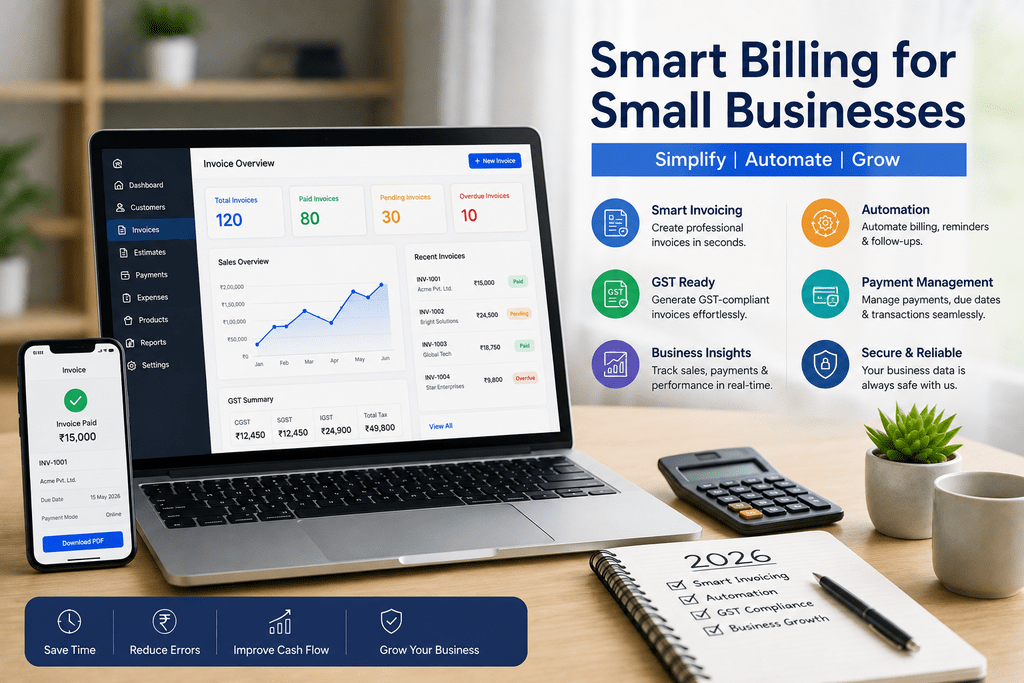
Managing invoices, payments, customer records and daily transactions can become challenging as a small business grows. Using Small Business Billing Software can help businesses organise routine billing activities, create professional invoices and maintain better visibility over financial transactions. In 2026, digital billing is becoming less about simply generating an invoice and more about creating a connected, efficient workflow.
From freelancers and retailers to service providers and growing startups, businesses are looking for tools that save time without creating unnecessary complexity. A well-planned billing system can support faster invoicing, easier payment follow-ups and more accurate business records.
Why Small Business Billing Is Changing in 2026
Small businesses increasingly need billing processes that work alongside their everyday operations. Manual spreadsheets, handwritten invoices and disconnected payment records can consume valuable time and make it harder to understand outstanding payments.
Modern billing solutions are moving towards automation, cloud access and better business visibility. This allows business owners to spend less time managing repetitive administrative tasks and more time focusing on customers and growth.
Faster Invoicing
Create and share professional invoices without repeatedly preparing documents manually.
Better Tracking
Keep invoices, payment information and customer transactions organised in one workflow.
Less Manual Work
Reduce repetitive billing activities and improve the efficiency of everyday administration.
Improved Visibility
Understand outstanding invoices and business transactions more easily.
Essential Billing Features for Growing Businesses
The right billing platform should make routine financial administration simpler rather than adding another complicated process. When evaluating a solution, businesses should consider features that support their current workflow while also allowing room for future growth.
- Professional invoice creation: Generate clear invoices with relevant customer and transaction information.
- Payment tracking: Monitor paid, pending and outstanding transactions more efficiently.
- Customer management: Maintain organised customer records for recurring business activities.
- Tax-friendly billing: Support accurate billing records and tax-related information where applicable.
- Cloud accessibility: Access important billing information from supported devices and locations.
- Reports: Use business information to understand sales, invoices and payment activity.
How Automation Can Improve Everyday Billing
Automation is one of the major business technology trends shaping 2026. Instead of repeatedly performing the same billing tasks, businesses can use digital workflows to simplify invoice preparation, payment monitoring and record management.
For example, automated invoice workflows can reduce the time required to prepare recurring invoices. Payment status tracking can also help business owners identify which transactions require attention, making follow-ups more organised.
2026 Insight: The best billing workflow is not necessarily the one with the most features. It is the one that removes unnecessary steps from everyday business operations.
Digital Billing and Better Business Records
Accurate records are important for businesses of every size. Digital billing can help maintain organised transaction information, making it easier to review invoices and payment activity when required.
Businesses operating under applicable tax regulations should ensure that their billing processes capture the information required for their invoices and records. A digital system can make record organisation easier, but businesses should always follow the latest applicable tax and accounting requirements.
How to Choose the Right Small Business Billing Software
Choosing a billing solution should begin with understanding the business’s actual needs. A freelancer may require simple invoice generation, while a growing business may need customer management, payment tracking, reporting and broader business-management capabilities.
Before selecting a platform, consider ease of use, scalability, accessibility, reporting capabilities, invoice customisation, payment tracking and the overall workflow. The objective should be to select a solution that makes billing easier for the team rather than adding more administrative steps.
Benefits of Moving to a Digital Billing Workflow
A structured digital billing process can influence several areas of daily business management. Beyond invoice generation, it can help create a more organised system for monitoring transactions and communicating with customers.
Save Administrative Time
Reduce repetitive billing activities and spend more time on core business tasks.
Stay Organised
Keep invoices and transaction information structured for easier access and review.
Improve Follow-Ups
Use payment status information to identify pending transactions that may need attention.
Support Growth
Build a billing workflow that can adapt as customer volume and business activity increase.
Small Business Billing Trends to Watch in 2026
Billing technology is becoming increasingly connected with wider business management. In 2026, small businesses can expect continued emphasis on automation, cloud-based access, mobile-friendly workflows, digital payments and actionable business reporting.
- More automation: Businesses will continue reducing repetitive administrative tasks.
- Cloud-first workflows: Remote access to business information will remain important.
- Mobile billing: Small businesses increasingly need flexible workflows beyond the traditional office environment.
- Connected business management: Billing is increasingly being combined with other operational functions.
- Better reporting: Business owners are looking for useful information rather than simply storing transaction data.
Ready to Simplify Your Business Billing?
Explore a smarter approach to invoicing, payment tracking and business management. Choose a billing workflow that saves time and supports your business as it grows.
Explore Billing SolutionsFrequently Asked Questions
Final Takeaway
Billing has become an important part of digital business management. In 2026, small businesses can benefit from moving beyond basic invoice creation towards organised, automated and accessible billing workflows. The right solution can help reduce repetitive administration, improve payment visibility and support better day-to-day operations.
For businesses looking to streamline invoicing and create a more efficient management process, Small Business Billing Software can be considered as part of a broader digital strategy.